Making a NixOS simple service file
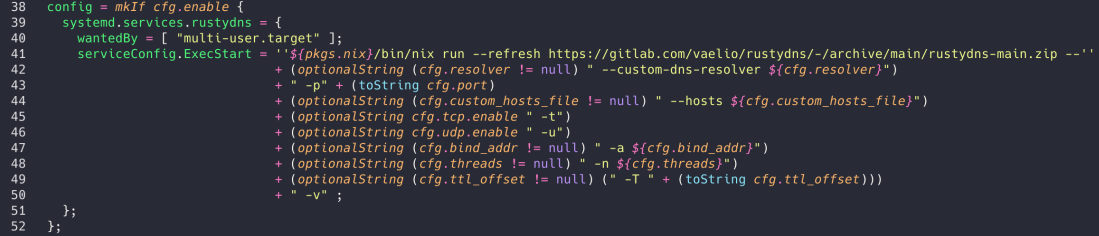
Lets say i went down in the rabbit hole of making my own very simple but limited dns server in order to learn the specs of it and for some fun. Now that all my laptops are on NixOS, i've got to make a service module to use.
If you want only the tl;dr: go check this file
Defining the options
Every service needs options right ?! Now let's say you wanted to have a port definition, intuitively it would look like this:
port = mkOption {
      type = types.port;
      default = 53;
    };
Now that part is fairly simple, you have the mkOption function that allows creating an option (There's mkEnableOption too, it's basically the same but with default settings). The type variable gives a type to the option (obviously) and the default gives the default value. You can also have an option description and stuff like that.
Now that's fairly simple but there's a twist we'll discuss later on.
Using the options
  config = mkIf cfg.enable {
    systemd.services.program = {
      serviceConfig.ExecStart = ''/path/to/program''
                                + " -p" + (toString cfg.port);
    };
  };
As you can see its pretty straight forward. You need to define a config, but this config needs to be enabled only if the service itself is enabled (Using a mkEnableOption), then we start defining the systemd service and specifically the ExecStart part of the systemd service file.
We then add the -p switch and our option with the toString trick.
This works and all but only because you can specify the port no matter what. Let's say you wanted to add an option such as --custom-dns-resolver 1.1.1.1.
For this option you should not specify the flag if the user of the service module have not used the config option. So how do you do that ?
Using optional options (lul)
In order to make a conditionnal flag with an option, we'll need to change the usual option definition:
bind_addr = mkOption {
  type = types.nullOr types.str;
  default = null;
};
As you can see here we specify a bind_addr option with the type types.nullOr types.str. Its fairly straight forward too but just in case, it defines a nullable string (default being null). This will allow us to use conditions like cfg.bind_addr != null.
To use it you need to use some conditions. Naively i tried doing if / else and all that but this only shows how much of a nix noob i am. Here's the solution:
  config = mkIf cfg.enable {
    systemd.services.program = {
      serviceConfig.ExecStart = ''/path/to/program''
                                + " -p" + (toString cfg.port);
                                + (optionalString (cfg.bind_addr != null) " -a ${cfg.bind_addr}")
    };
  };
So optionalString takes two args: condition and str. If the condition is true it returns str and the ${cfg.bind_addr} part is basically like bash $var .
Fairly simple again, but if you don't know it, you can't do it.